HYBRID TRAINING · iPHONE & APPLE WATCH
base.
Building muscle and improving endurance at the same time pulls in opposite directions, and the thing that decides whether it works is whether you can see all of it at once. base. puts strength, endurance and nutrition in one plan, reads your health data as it arrives, and moves the targets when your training does. It is on the App Store for iPhone and Apple Watch.
Visit trybase.app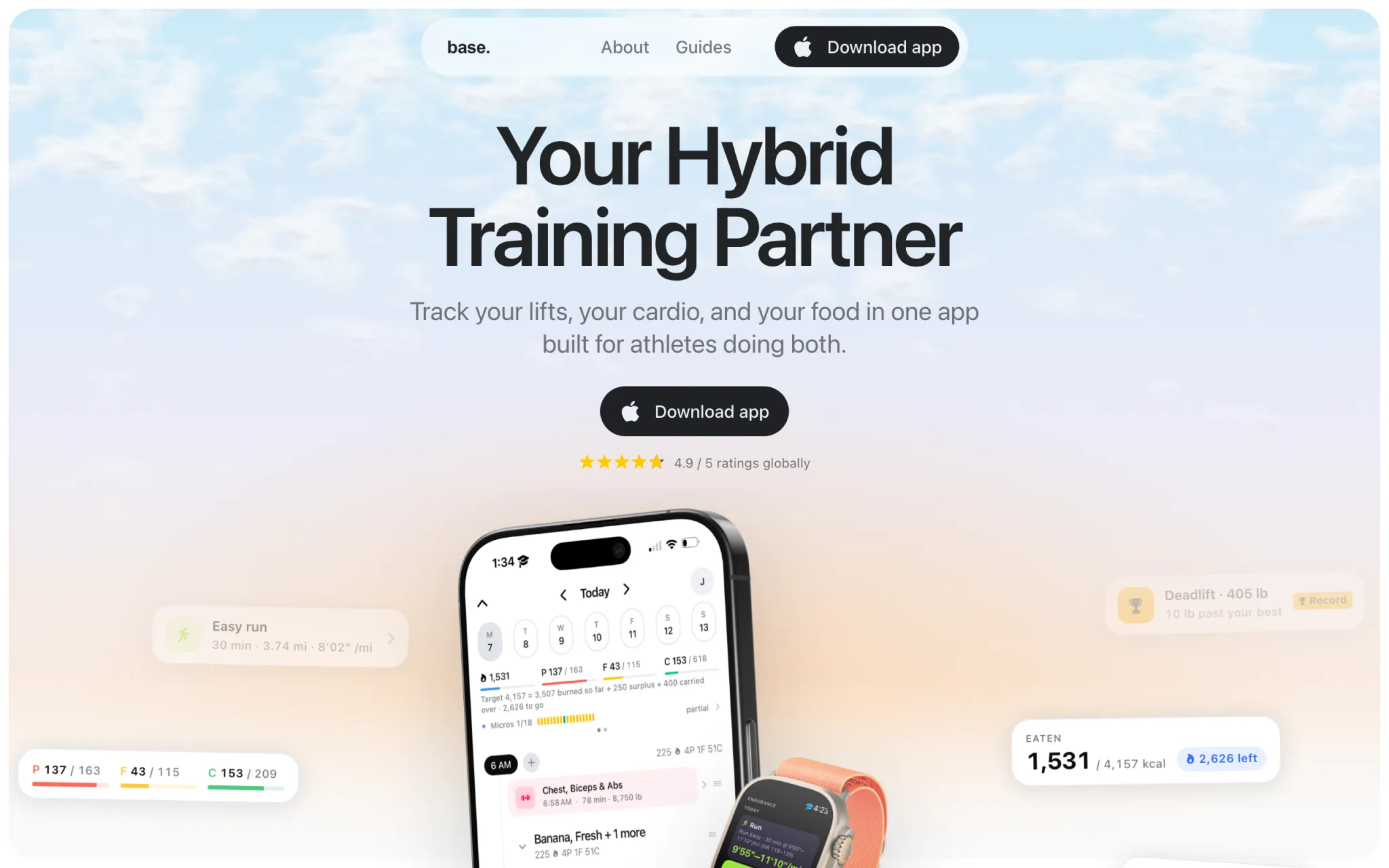
- 18
- micronutrients tracked, not just the three macros
- 6
- health signals banded against your own baseline
- 5
- surfaces: dashboard, food log, coach, workout, endurance
- 2
- platforms: iPhone and Apple Watch
Counted from what the App Store listing shows. There are deliberately no install or rating figures: the app shipped on 18 September 2026, Apple reports no ratings yet, and a launch-week download count would not mean anything.
FEATURE BY FEATURE
What base. actually does
01
One day, both disciplines
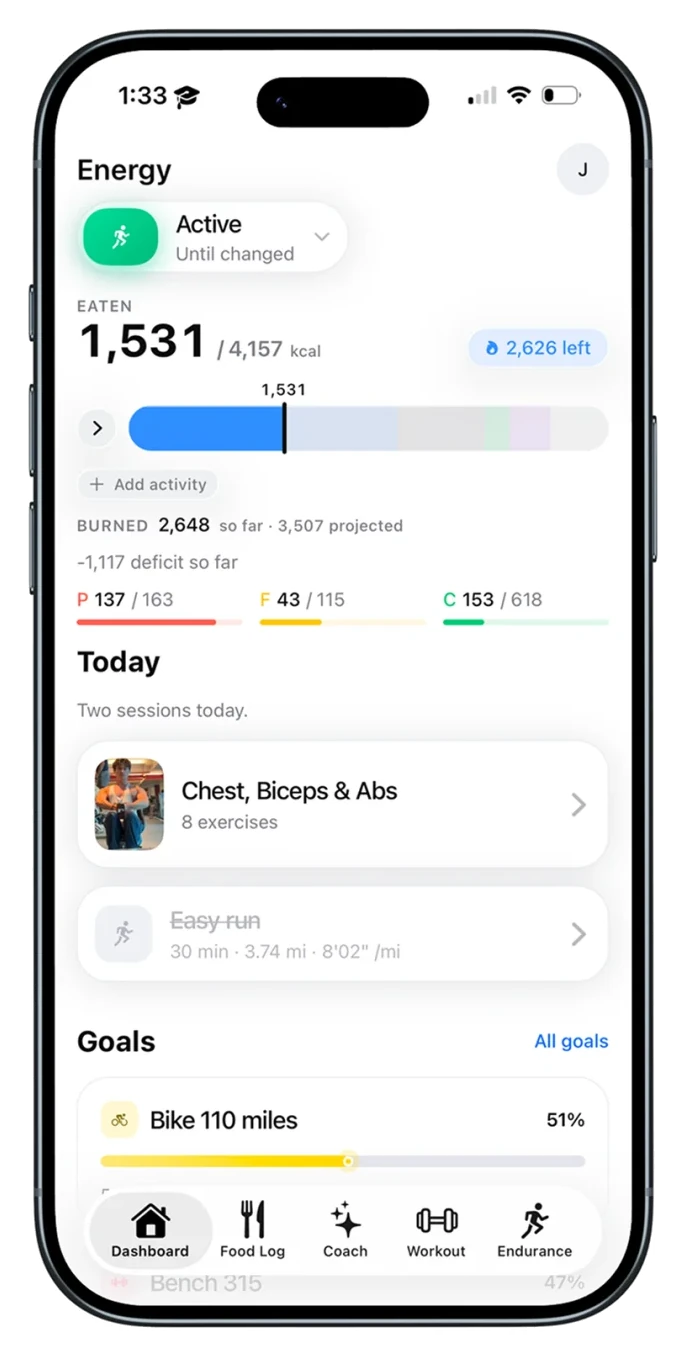
The dashboard answers the only question that matters in the morning: what has to happen today, and how much have I got left to spend. Energy eaten against energy burned, the three macros underneath, then the day's sessions, with a completed one struck through. Long-range goals sit below, because a 110 mile week and a 315 pound bench are the reason any of the daily numbers are set where they are.
BUILT WITH
Expo Router with a local SQLite copy of the day, so the screen renders before the network answers. The energy line recomputes as health data arrives rather than on a refresh.
02
Strength and endurance in the same record
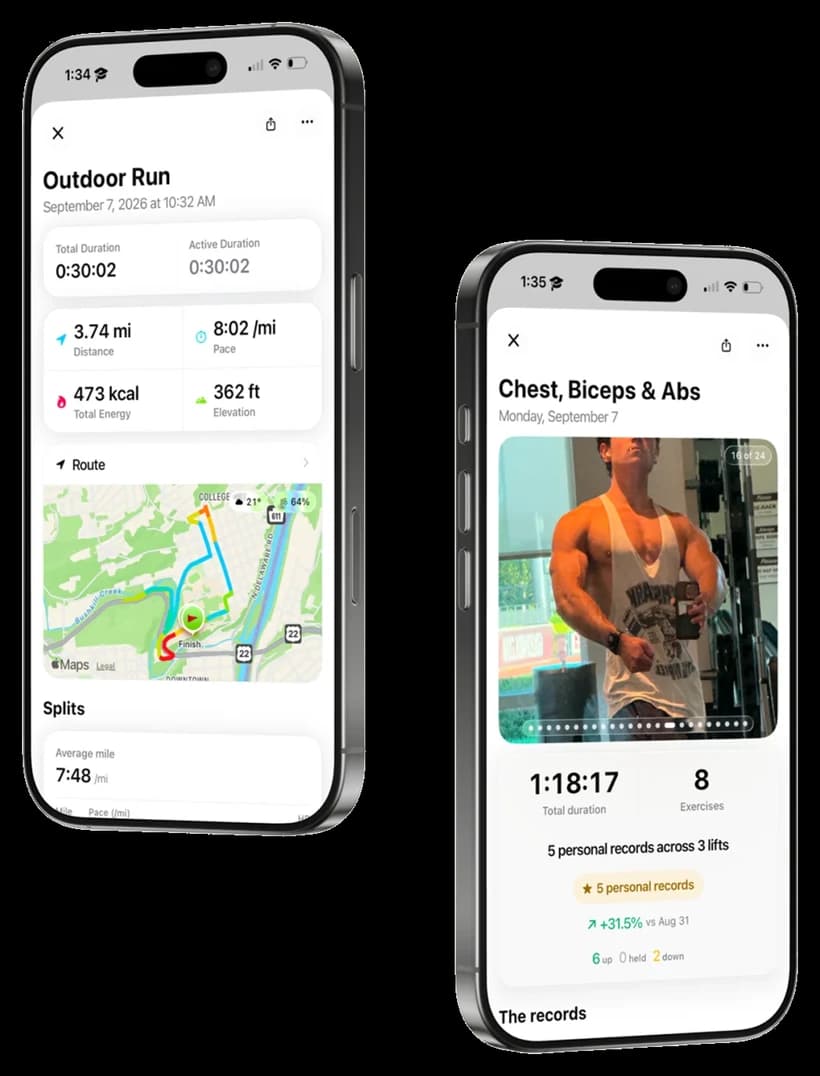
A run resolves to duration, distance, pace, energy, elevation, route and per-mile splits. A lift resolves to duration, exercise count, and what actually changed: five personal records across three lifts, up 31.5% on the same session three weeks earlier, with six lifts up, none held and two down. Both are the same kind of object to the app, which is what lets a week be judged as one thing.
BUILT WITH
Workouts come from HealthKit where the watch recorded them and from the app where it did not, deduplicated against source and time window before anything is drawn.
03
Food logged by hour, and by micronutrient
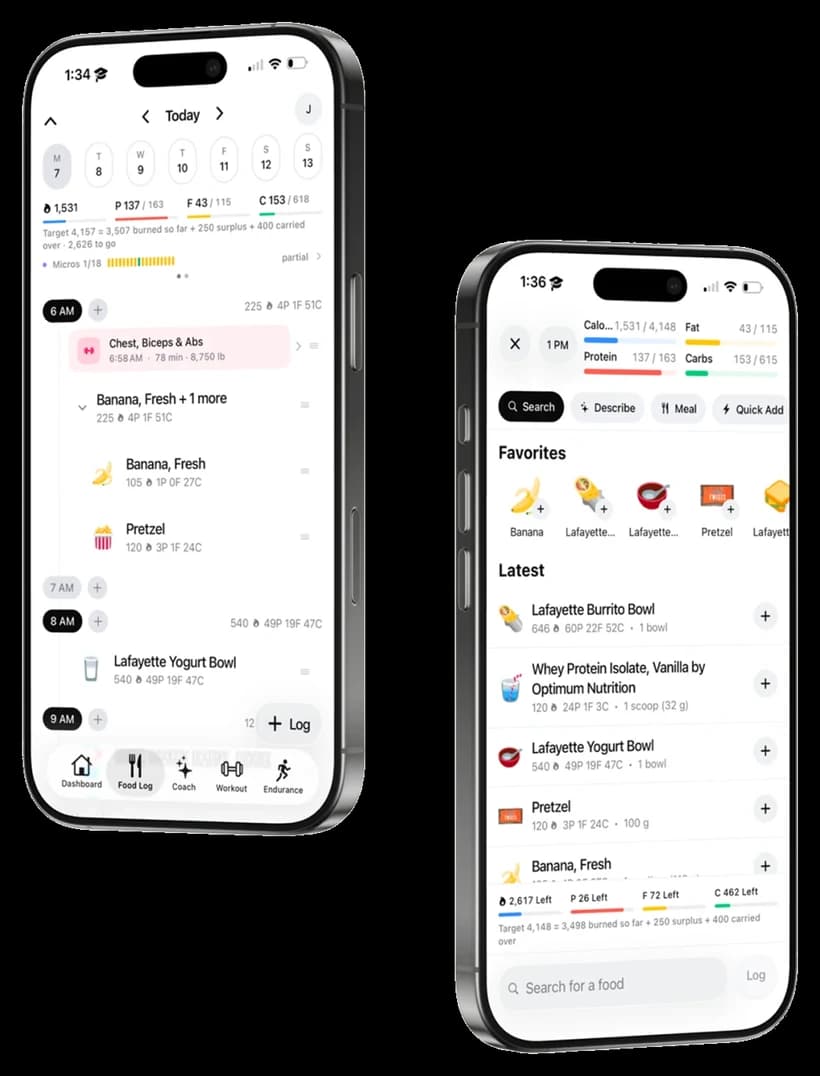
The log is a timeline rather than a list, so a 6am session and the meal after it sit in the order they happened. Eighteen micronutrients are tracked alongside the three macros, with a partial marker when the day's entries cannot account for them all, which is most days and is better said than hidden.
BUILT WITH
Entry has four paths: search, a described meal in plain language, a saved meal, or a quick add. Frequently used and recent items are held locally, so the common case is one tap.
04
Recovery, against your own baseline
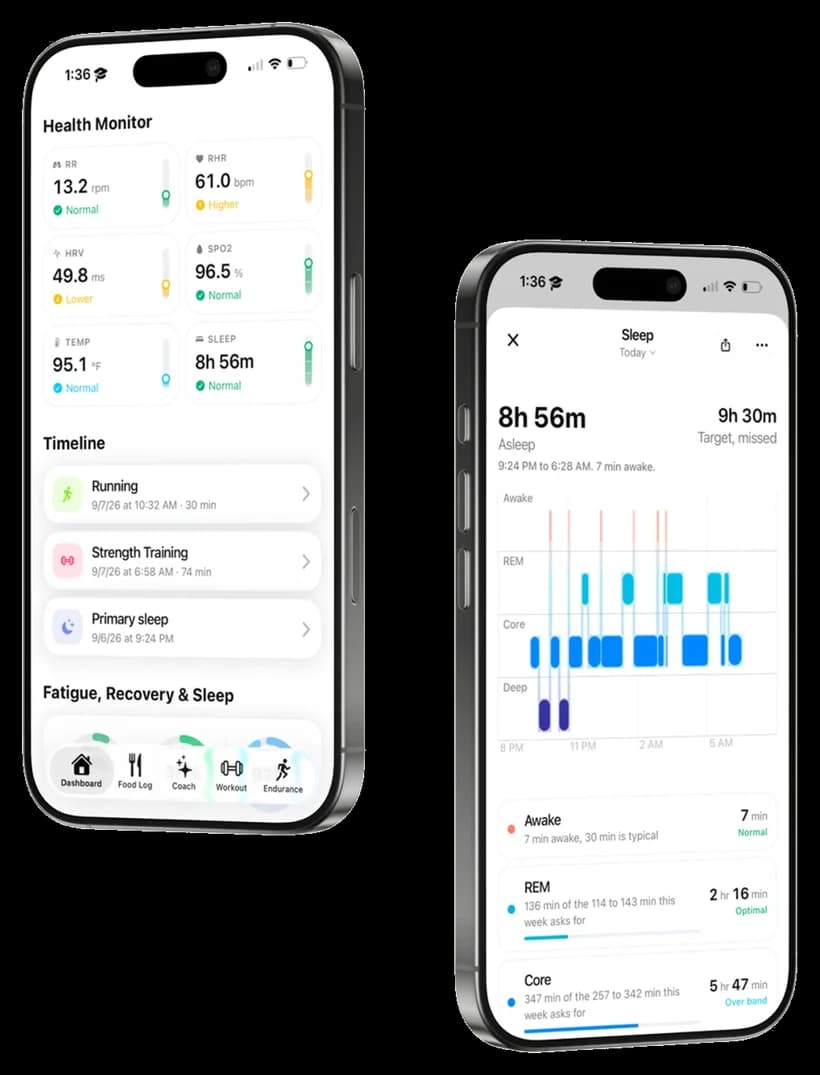
Respiratory rate, resting heart rate, HRV, blood oxygen, temperature and sleep, each labelled normal, higher or lower for you rather than against a population. Under it the day's timeline, and under that the sleep detail: stages across the night with each one banded against what the current training week asks for.
BUILT WITH
A native HealthKit module, reading in the background so the numbers are current when the app opens. Values can arrive late or twice, so every derived band is recomputed from the record rather than cached from when it was first drawn.
01The problem with training for two things
Strength and endurance want opposite things from you. Lifting asks for a surplus and enough recovery to adapt; distance work burns through that surplus and takes the recovery with it. Train for both and the deciding variable stops being either programme and becomes the arithmetic between them.
Every app I tried owned one third of that. Lifting apps track volume and know nothing about a four hour ride. Running apps track pace and treat a heavy squat day as a rest day. Nutrition apps hold a calorie target still, which is the one thing it cannot be when your burn swings by 1,500 calories depending on what you did that morning.
So the product is not a lifting tracker with a run tab bolted on. The unit is the day, and the day has to reconcile three things that disagree.
02The energy target is a calculation, and it is shown
The most load-bearing screen in the app is a single line under the macro rings: the target, written as the sum that produced it. On the day in the App Store screenshots it reads as 4,157 calories, made of 3,507 burned so far plus a 250 surplus plus 400 carried over from the day before.
Showing the identity rather than the result is a deliberate product decision and it came out of an engineering one. A target that moves during the day looks broken if you cannot see why it moved. It goes up because you trained, and unless the app says so, the user assumes a bug and stops trusting the number that the whole plan rests on.
The carry-over term is the part that took the longest to get right. Days do not settle at midnight for someone who trains in the evening, and a strict daily reset punishes an athlete for the schedule rather than the behaviour. Letting a deficit or surplus roll forward is closer to how the body actually accounts for it, and it turns a hard boundary into a moving window.
03Health data arrives messy
The health monitor reads six signals: respiratory rate, resting heart rate, heart rate variability, blood oxygen, body temperature and sleep. Each is labelled against the user's own history rather than a population norm, so a resting heart rate of 61 reads as Higher because it is higher for that person, not because 61 is high.
That personal banding is the reason the integration is harder than calling HealthKit and drawing the result. HealthKit is a shared store that several devices write into, so the same workout can appear twice from a watch and a phone, values arrive out of order and backfill days later, and a gap in the record is indistinguishable from a genuine zero. Anything that computes a baseline has to be built on the assumption that yesterday's data can change after you have already shown a conclusion drawn from it.
Sleep gets the same treatment one level deeper. The stage chart is banded per stage against what the current training week asks for, so 136 minutes of REM reads as optimal inside a 114 to 143 minute range that itself moves with the load. That range is derived, which means it is only as good as the history behind it, and early on there is not much history. Being explicit about which numbers are measured and which are derived from a short record is the honest version of this feature.
04How it is built
The app is Expo and React Native in TypeScript, with Expo Router for navigation. Supabase and Postgres sit behind it, with Drizzle for typed schema and migrations, and expo-sqlite holds a local copy so the day's plan opens without waiting on a network call.
HealthKit is reached through a native module rather than a polling loop, because the useful events are the ones that arrive while the app is closed. The Apple Watch app is its own build target with its own Swift module, which is the part of this project I would point at first: an Expo app and a watchOS target sharing one plan without either becoming a wrapper around the other.
The watch deliberately does very little. It shows the session you are in and the numbers that change while you are moving. Everything that requires typing, reviewing or deciding stays on the phone, because a watch is a glance and treating it as a small phone is how watch apps end up unused.
05What is genuinely unfinished
This shipped on 18 September 2026 at version 1.0, and the honest status is that the adaptive planning is the least proven part of it. Adapting a target is a control problem, and a control loop with a short history and a noisy input will oscillate if you let it react too fast. The current version damps hard and is deliberately slower to respond than it could be, which is the right default and not the right answer.
Android is partly in the codebase and not shipped. The Health Connect integration exists, the App Store build is iOS only, and there is no Play Store listing, so this page says iPhone and Apple Watch.
06Built with
- TypeScript
- React Native
- Expo
- Expo Router
- watchOS
- Swift
- HealthKit
- Supabase
- PostgreSQL
- Drizzle ORM
- SQLite
- Reanimated
- PostHog